

Description
Download Movie Collector – Free Movie Organizer, Catalog & Library Manager
Overview & Why Movie Collector Stands Out
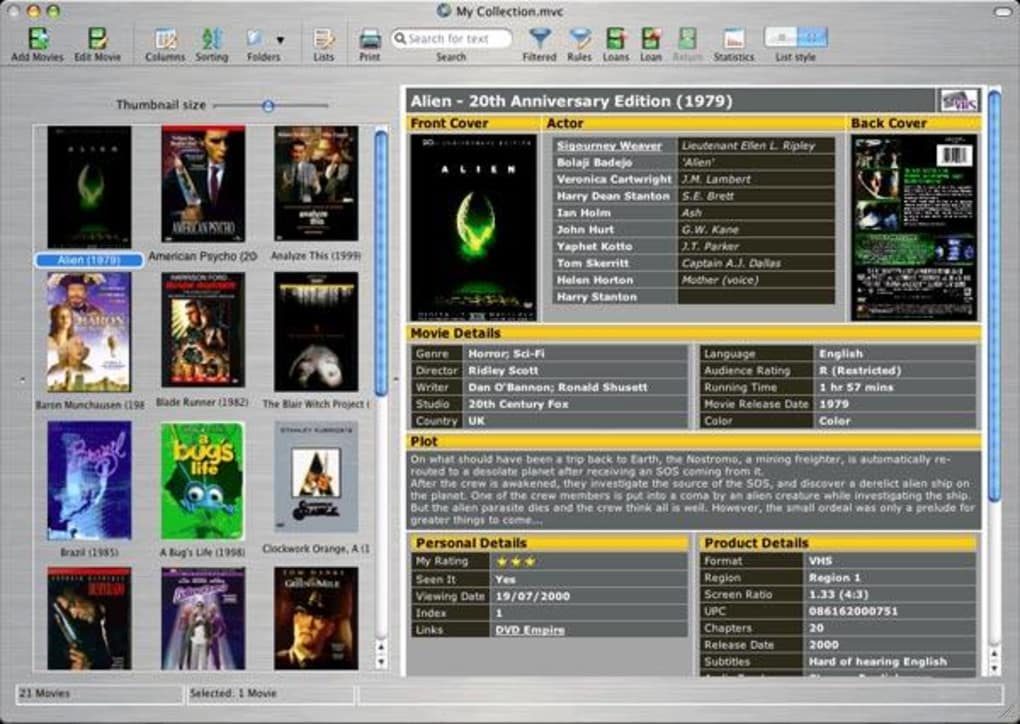
Managing a growing movie library can quickly become overwhelming, especially when files are scattered across multiple drives, folders, or external storage devices. Movie Collector is a powerful, yet user‑friendly software solution designed to bring order to even the most chaotic collections. The free version lets you catalogue up to 50 titles, while paid tiers unlock unlimited entries and advanced metadata options. What sets Movie Collector apart is its ability to automatically pull detailed information—cover art, cast, crew, plot summaries, and episode listings—directly from online databases, ensuring each entry is rich and searchable. The interface is highly customizable, allowing you to define your own categories, tags, and sorting rules, so the library reflects your personal viewing habits. Whether you are a casual film enthusiast or a serious archivist, the tool speeds up browsing, improves discoverability, and makes sharing your curated lists with friends or mobile devices effortless. In this review we’ll dive deep into the core features, walk through the installation process, examine platform compatibility, and weigh the pros and cons to help you decide if Movie Collector is the right addition to your digital entertainment toolkit.
Powerful Features That Keep Your Film Library Tidy
- Automatic Metadata Retrieval: Connects to major movie databases (IMDb, TMDb, TheMovieDB) to fetch high‑resolution cover art, synopsis, cast & crew details, and genre tags.
- Customizable Categorisation: Create user‑defined collections, tags, and smart filters based on year, director, rating, or personal criteria.
- Bulk Scanning & Import: Scans internal and external hard drives, network shares, or USB sticks to locate video files and add them to the database in seconds.
- Export & Sync Options: Export lists to CSV, HTML, or directly sync with the companion mobile app for on‑the‑go access.
- Multi‑Language Support: Interface available in English, Spanish, French, German, and more, making it accessible worldwide.
- Secure Cloud Backup (Premium): Keep your catalog safe with encrypted cloud sync, ensuring no data loss if a drive fails.
- Advanced Search Engine: Full‑text search across titles, tags, and notes, with instant results as you type.
Pros
- Rich, automatically populated metadata saves hours of manual entry.
- Highly flexible tagging and categorisation system.
- Fast bulk scanning that works on both Windows and macOS.
- Free trial supports up to 50 movies—perfect for testing.
- Companion mobile app enables library access on Android and iOS.
Cons
- Free version limited to 50 titles; larger collections require purchase.
- Linux support relies on Wine, which may affect performance for some users.
- Initial metadata download can be bandwidth‑heavy on slow connections.
- No built‑in video playback; you must use an external player.
- Advanced cloud backup is only available in the paid tier.
Installation, Compatibility & Easy‑to‑Follow Usage Guide
Installing Movie Collector is straightforward. Download the installer from the official website, choose the appropriate version for your operating system, and follow the on‑screen prompts. The setup wizard offers a typical installation (default settings) and a custom mode where you can select the installation folder, create desktop shortcuts, and decide whether to launch the program automatically at startup.
Operating System Compatibility: Movie Collector runs natively on Windows 7/8/10/11 (64‑bit), macOS 10.13 and later, and offers a limited Linux version via Wine. For mobile users, a companion app is available on Android 6.0+ and iOS 12+. All versions share the same core database, ensuring seamless synchronization when you export or use the cloud backup feature.
Once installed, launch the application and point it to the folder(s) containing your video files. The built‑in scanner will enumerate every supported format (MP4, MKV, AVI, MOV, etc.), read file names, and suggest matches from online databases. You can accept the automatic matches or manually edit any entry. To organise your collection, use the left‑hand panel to create new categories (e.g., “Classic Noir,” “Sci‑Fi Series,” “Family Favorites”) and drag titles into these groups. The search bar at the top provides instant filtering, while the advanced filter dialog lets you combine multiple criteria (year > 2000 AND rating ≥ 8). Export options are located under the “File” menu; choose CSV for spreadsheet use, HTML for a web‑ready list, or “Sync to Mobile” to push the collection to your phone.
Supported operating systems: Windows 7‑11 (64‑bit), macOS 10.13‑13, Linux (via Wine), Android 6.0+, iOS 12+.
Frequently Asked Questions & Final Verdict
Can Movie Collector import existing folder structures?
Yes. During the initial scan you can point the software to any folder, and it will read all video files inside sub‑folders, preserving the original hierarchy as optional tags or categories.
Is there a limit on the number of custom tags I can create?
The free version does not impose a strict tag limit, but performance may degrade if you create thousands of tags. Paid licenses remove any practical restrictions.
How does the cloud backup work and is it secure?
Cloud backup (available in Premium) encrypts your database with AES‑256 before transmitting it to the provider’s servers. Only you hold the decryption key, ensuring that your library remains private.
Can I share my movie list on social media?
Yes. Export your list to HTML or use the built‑in “Share” button to generate a public link that can be posted on Facebook, Twitter, or Reddit.
Is there a trial period for the premium features?
The free version lets you manage up to 50 movies indefinitely. A 14‑day trial of the Premium tier is available, after which you can choose to purchase a license or revert to the free mode.
Conclusion – Organise Your Films with Confidence
If you’ve been searching for a reliable, feature‑rich tool to bring order to your movie stash, Movie Collector delivers on its promises. Its automatic metadata fetching, flexible categorisation, and cross‑platform sync make it a standout choice for both casual viewers and serious archivists. While the free tier’s 50‑movie cap may feel restrictive for large libraries, the reasonably priced premium upgrade unlocks unlimited entries, cloud backup, and additional export formats. Installation is quick, the interface is intuitive, and the support community is active. In short, Movie Collector offers a secure, scalable solution that turns a chaotic folder mess into a searchable, beautifully presented catalog. Download the free version today, explore its capabilities, and if it meets your needs, consider the full license to enjoy unlimited movie management. Your next binge‑watch session will thank you.
Guides & Tutorials for Movie Collector
How to install Movie Collector
- Click the Preview / Download button above.
- Once redirected, accept the terms and click Install.
- Wait for the Movie Collector download to finish on your device.
How to use Movie Collector
This software is primarily used for its core features described above. Open the app after installation to explore its capabilities.
User Reviews for Movie Collector 0
No reviews found





.webp)